
How Gasoline Executes Page Scripts
The Problem: Pages Fight Back
Section titled “The Problem: Pages Fight Back”Running JavaScript on a web page sounds simple. It’s not.
Modern web applications use Content Security Policy (CSP) to restrict what scripts can run. Sites like Gmail, Google Docs, and banking apps use Trusted Types — a CSP directive that blocks eval(), new Function(), and any dynamic code execution.
This means a naive approach (inject a script tag, run some code) fails silently on millions of production websites.
Gasoline solves this with a three-world execution model that automatically detects CSP restrictions and falls back to the right approach.
The Three Worlds
Section titled “The Three Worlds”When you call interact({action: "execute_js", script: "document.title"}), Gasoline chooses one of three execution worlds:
World 1: Main (Page Context)
Section titled “World 1: Main (Page Context)”interact({action: "execute_js", script: "document.title", world: "main"})The script runs in the same JavaScript context as the web page. It can:
- Access page globals (React state, Vue stores, Angular services)
- Call functions defined by the page
- Read and modify the DOM
- Access
window,document, and any page-defined objects
How it works:
MCP call → Go server → Extension background →Content script → window.postMessage → inject.js →new Function(script)() → Result back through the chainThe inject.js layer runs in Chrome’s MAIN world, sharing the page’s execution context. It wraps your script in new Function() for safe execution with a timeout.
When it fails: Sites with CSP script-src restrictions or Trusted Types block new Function(). The script silently fails.
World 2: Isolated (Extension Context)
Section titled “World 2: Isolated (Extension Context)”interact({action: "execute_js", script: "document.title", world: "isolated"})The script runs in Chrome’s isolated world — a separate JavaScript context with full DOM access but no access to page globals.
How it works:
MCP call → Go server → Extension background →chrome.scripting.executeScript({world: 'MAIN', func: ...})Chrome itself injects the function. Because Chrome is the execution agent (not the page), CSP doesn’t apply. The script bypasses Trusted Types, script-src restrictions, and any other CSP directive.
What it can do:
- Full DOM access (read, modify, query elements)
- Run any JavaScript Chrome’s V8 engine supports
What it can’t do:
- Access page-defined globals (React state, Vue stores, etc.)
- Call functions the page defined
- Access
window.__myAppor similar page-level objects
World 3: Auto (Smart Fallback)
Section titled “World 3: Auto (Smart Fallback)”interact({action: "execute_js", script: "document.title", world: "auto"})This is the default and the one you should almost always use.
How it works:
- Try MAIN world via inject.js (fast, full page access)
- If CSP blocks it, detect the error
- Automatically retry via
chrome.scripting.executeScript(CSP-proof) - Return the result — the caller never knows which path was used
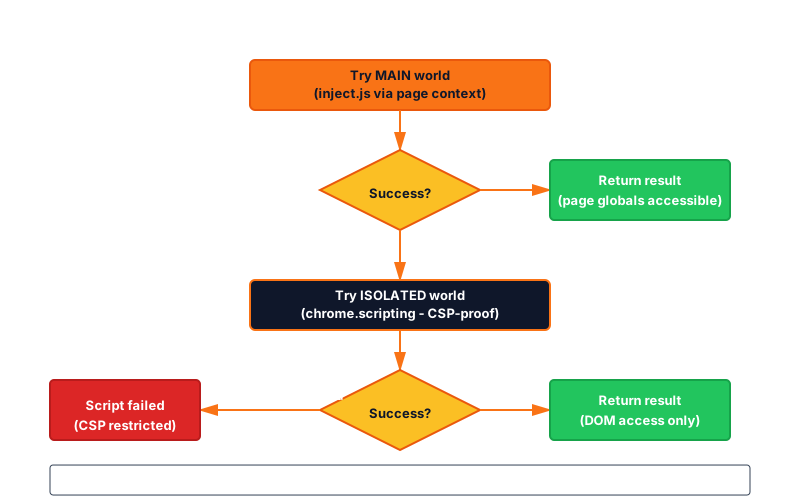
The auto mode means you don’t need to know whether a site uses CSP. Gasoline figures it out and picks the right path.
The Gmail Problem (and How It’s Solved)
Section titled “The Gmail Problem (and How It’s Solved)”Gmail is one of the most CSP-restrictive sites on the internet. It uses:
script-srcwith strict nonce requirements- Trusted Types that block all dynamic code creation
- CSP headers that prevent inline scripts
A typical browser automation tool fails on Gmail entirely. Gasoline’s auto fallback handles it transparently:
- First attempt: inject.js tries
new Function(script)— Gmail’s CSP blocks it - Detection: The error is caught and identified as a CSP violation
- Fallback:
chrome.scripting.executeScriptinjects the code natively — Chrome bypasses its own CSP for extension APIs - Result: The script executes, the result returns, the caller never knew there was a problem
This is why Gasoline can automate Gmail (compose emails, read inboxes, click buttons) while tools that depend on --remote-debugging-port and CDP’s Runtime.evaluate struggle with CSP-heavy sites.
Timeouts and Error Handling
Section titled “Timeouts and Error Handling”Every script execution has a configurable timeout:
interact({action: "execute_js", script: "longRunningOperation()", timeout_ms: 10000})Default: 5 seconds. Maximum: configurable per call.
If the script hangs (infinite loop, blocking network call), Gasoline:
- Kills the execution after the timeout
- Returns a clear error: “Script execution timed out after 10000ms”
- Does not leave the page in a broken state
What You Can Do with execute_js
Section titled “What You Can Do with execute_js”Read page state
Section titled “Read page state”interact({action: "execute_js", script: "document.title"})interact({action: "execute_js", script: "window.location.href"})interact({action: "execute_js", script: "document.querySelectorAll('li').length"})Access framework state (main world only)
Section titled “Access framework state (main world only)”interact({action: "execute_js", script: "document.querySelector('#app').__vue__.$store.state.user", world: "main"})Modify the page
Section titled “Modify the page”interact({action: "execute_js", script: "document.body.style.backgroundColor = 'red'"})Run complex logic
Section titled “Run complex logic”interact({action: "execute_js", script: "Array.from(document.querySelectorAll('table tr')).map(r => Array.from(r.cells).map(c => c.textContent))"})Check for specific conditions
Section titled “Check for specific conditions”interact({action: "execute_js", script: "!!document.querySelector('.error-banner')"})Quick Reference
Section titled “Quick Reference”| World | Page globals | DOM access | CSP-proof | Speed |
|---|---|---|---|---|
main | Yes | Yes | No | Fastest |
isolated | No | Yes | Yes | Fast |
auto | Tries both | Yes | Yes (fallback) | Fast with fallback |
Rule of thumb: Use auto (the default) for everything. Only specify main when you explicitly need page globals, or isolated when you know CSP will block and want to skip the fallback attempt.