
Technical Architecture
The Big Picture
Section titled “The Big Picture”Gasoline has three components: a Chrome extension that captures browser telemetry, a Go server that stores and serves it, and the MCP protocol that connects everything to your AI tool.

The Three-Layer Extension
Section titled “The Three-Layer Extension”The Chrome extension uses a three-layer architecture, each running in a different security context:
Layer 1: inject.js (Page Context)
Section titled “Layer 1: inject.js (Page Context)”Runs in the MAIN world — the same JavaScript context as the web page. This gives it access to:
console.log/warn/error— intercepted via monkey-patchingwindow.fetchandXMLHttpRequest— for network body captureWebSocket— constructor wrapped to capture connections and frameswindow.addEventListener— for user action recording (click, input, submit)- Web Vitals APIs — PerformanceObserver for LCP, CLS, INP, FCP
This is the only layer that can see what the page’s JavaScript is actually doing.
Layer 2: content.js (Isolated World)
Section titled “Layer 2: content.js (Isolated World)”Runs in Chrome’s isolated world — separate from the page’s JavaScript, but with full DOM access. It:
- Receives messages from inject.js via
window.postMessage - Forwards them to the background service worker via
chrome.runtime.sendMessage - Handles subtitle display (creates and manages the narration overlay element)
- Handles action toast display (the blue/green notification banners)
- Manages script injection (loads inject.js into the page)
Layer 3: background.js (Service Worker)
Section titled “Layer 3: background.js (Service Worker)”The extension’s service worker — no DOM access, but full extension API access. It:
- Batches incoming telemetry from content scripts
- POSTs data to the Go server via HTTP
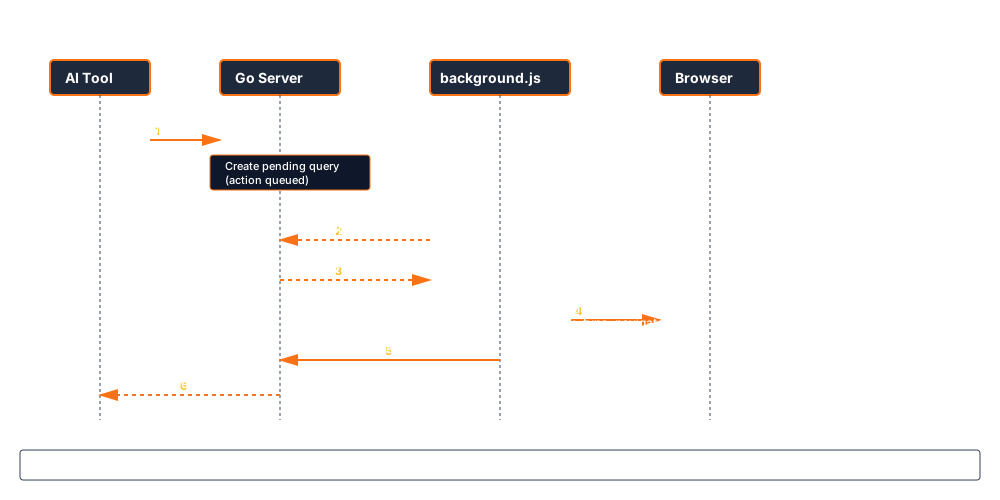
- Polls the server for pending queries (commands the AI wants to execute)
- Executes DOM primitives (click, type, scroll) via
chrome.scripting - Manages extension state (which tabs are connected, what’s enabled)
Communication Flow
Section titled “Communication Flow”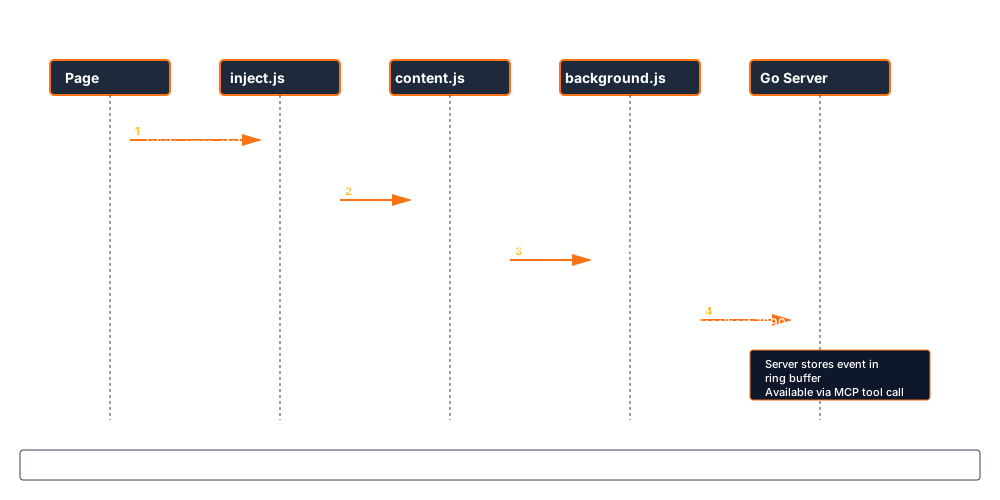
The reverse flow (AI → browser) works through the pending query system:
Ring Buffers
Section titled “Ring Buffers”All telemetry is stored in generic ring buffers — fixed-size circular arrays that evict the oldest entries when full. This gives predictable memory usage regardless of how long the session runs.
Buffer Capacities
Section titled “Buffer Capacities”| Buffer | Max Entries | Max Memory |
|---|---|---|
| Console logs | 1,000 | — |
| Extension logs | 500 | — |
| WebSocket events | 500 | 4 MB |
| Network bodies | 100 | 8 MB |
| Network waterfall | 1,000 (configurable) | 500 KB |
| WebSocket connections | 20 active + 10 closed | 2 MB |
| Pending queries | 15 | 1 KB |
Cursor-Based Pagination
Section titled “Cursor-Based Pagination”Every buffer supports cursor-based reads. When an AI requests data, it receives a cursor with the response. On the next request, it passes the cursor back to get only new entries — no duplicates, no missed data, even if the buffer wrapped around.
type BufferCursor struct { Position int64 // Monotonic counter (never wraps) Timestamp time.Time // When this position was valid}This is critical for long-running sessions where the AI periodically checks for new errors or events.
The Bridge Pattern (Multi-Client)
Section titled “The Bridge Pattern (Multi-Client)”A unique challenge: multiple AI tools need to share the same browser telemetry. Claude Code and Cursor might both be connected simultaneously.
Gasoline solves this with the stdio bridge pattern:
Claude Code → npx gasoline-mcp (stdio) ──┐Cursor → npx gasoline-mcp (stdio) ──┼──► Gasoline Server (HTTP :7890)Zed → npx gasoline-mcp (stdio) ──┘ ↕ Browser ExtensionEach MCP client spawns its own stdio process. The first process starts the HTTP server. Subsequent processes detect the running server and switch to bridge mode — proxying MCP JSON-RPC calls over HTTP to the shared server.
This means:
- All clients see the same telemetry
- No port conflicts — everyone connects to the same server
- The server persists across client disconnects (daemon mode is the default)
- Zero configuration — the bridge detection is automatic
Server Lifecycle
Section titled “Server Lifecycle”Every MCP client connection follows a 6-step lifecycle:
- Check — TCP probe to see if server is running on the configured port
- Launch — If no server, spawn the HTTP server as a background process (cold start: ~400ms)
- Connect — If server exists, connect as a bridge client
- Retry — If connection fails, retry up to 3 times with exponential backoff (1-3s)
- Recover — If still failing, kill the unresponsive server and spawn a fresh one
- Debug — If recovery fails, write debug log to
/tmp/gasoline-debug-*.logand exit
Performance Targets
Section titled “Performance Targets”| Metric | Target | Measured |
|---|---|---|
| Cold start | < 600ms | 300-410ms |
| Console intercept overhead | < 0.1ms | < 0.1ms |
| HTTP endpoint latency | < 0.5ms | < 0.5ms |
| Concurrent clients | 100+ | Tested at 100 |
| Event rate limit | 1,000 events/sec | Circuit breaker (HTTP 429) |
| Tool call rate limit | 500 calls/min | MCP-level limiter |
Security Boundaries
Section titled “Security Boundaries”Gasoline enforces strict security at every layer:
- Localhost only. The Go server binds to
127.0.0.1. It never accepts remote connections. There is no configuration option to change this. - No debug port. No
--remote-debugging-port. Chrome’s security sandbox stays intact. - Header stripping. Authorization headers, cookies, and tokens are automatically removed from captured network data.
- Network bodies opt-in. Request/response body capture is off by default. You explicitly enable it.
- AI Web Pilot opt-in. Browser control is off by default. You enable it in the extension popup.
- No external transmission. No analytics, no telemetry, no phone-home. Data never leaves your machine.
Zero Dependencies
Section titled “Zero Dependencies”The Go server has zero production dependencies — no external packages, no frameworks, no ORMs. Everything is built on Go’s standard library:
- HTTP server:
net/http - JSON handling:
encoding/json - Concurrency:
sync.RWMutex - File I/O:
osandbufio - MCP protocol: Hand-rolled JSON-RPC 2.0
This means:
- Zero supply chain risk. No
go.sumvulnerabilities to patch. - Fast compilation. No dependency resolution. Build in seconds.
- Single binary.
go buildproduces one executable. No runtime to install. - Long-term stability. Go’s compatibility guarantee. Code written today compiles tomorrow.
The Five Tools
Section titled “The Five Tools”Everything Gasoline does is exposed through exactly five MCP tools:
| Tool | Purpose | Modes |
|---|---|---|
| observe | Read browser state | 30 modes (errors, network, WebSocket, vitals, recordings, screenshots, storage, etc.) |
| analyze | Active analysis | 27 modes (DOM queries, accessibility, security, link health, annotations, forms, visual diff, etc.) |
| generate | Create artifacts | 13 formats (tests, reproductions, HAR, SARIF, CSP, SRI, test healing, etc.) |
| configure | Manage the session | 29 actions (noise rules, storage, recording, streaming, health, sequences, etc.) |
| interact | Control the browser | 58 actions (navigate, click, type, upload, draw mode, recording, batch, explore, etc.) |
Five tools. Not fifty. The AI doesn’t need to choose from a sprawling API — it picks the right tool and the right mode. This constraint keeps the interface learnable and the implementation maintainable.
Deep-Dive Architecture Diagrams
Section titled “Deep-Dive Architecture Diagrams”For a detailed understanding of how all the pieces fit together, check out our comprehensive architecture diagrams:
System Architecture (C4 Model)
Section titled “System Architecture (C4 Model)”- C2: Container Architecture — The 5 main system components and how they communicate (AI Agent, Wrapper, Go Server, Extension, Browser)
- C3: Component Architecture — Go package structure showing all 40+ packages organized in 5 layers (Foundation, Domain, Tools, HTTP Server, Utilities)
Request-Response Flows
Section titled “Request-Response Flows”- Request-Response Cycle — Complete MCP command flow showing how AI requests become browser actions and how results are returned (immediate, query+polling, one-way, and error scenarios)
- Extension Message Protocol — All 6 HTTP message types between extension and server with complete JSON schemas, state machines, and reliability patterns
Data Flow
Section titled “Data Flow”- Data Capture Pipeline — How telemetry flows from page observers → extension batchers → server ring buffers, with detailed specifications for all 7 event types (console, network, actions, WebSocket, performance, errors) and memory management strategy